

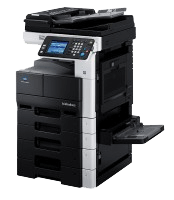
The Konica Minolta Bizhub 224e is a versatile multifunction printer designed to enhance office productivity with its robust features. It offers high-quality black-and-white printing, scanning, and copying at speeds of up to 22 pages per minute, making it ideal for small to medium-sized businesses. With its intuitive touch-screen interface, advanced security features, and eco-friendly design, the Bizhub 224e ensures efficient and secure document handling. Its modular structure allows easy upgrades to meet evolving business needs, delivering exceptional performance and reliability. It involves a step by step process to set up the scanning feature over your office network.
STEP
- Open the local disc and create a folder that should be named scan( or any other thing)
- Right click on the folder and select on properties.
- Click on the sharing tab
- Click on share and then click on advanced sharing and check on who can read and write in the folder through the network
- Log in your printer by typing its IP address on your web browser. Konica Minolta printer admin password is normally 12345678.
